GamesList Manager

A comprehensive desktop application for managing your video game collection and tracking your gaming sessions

Version 2.0.3 Brand-new Flet UI GPL-3.0 License Discord Integration

โœจ What's New in 2.0

New in v2.0.0

A Brand-New Interface

Version 2.0 is a complete UI rewrite on Flet (Flutter) โ€” a faster, modern, native desktop app. Everything you relied on is here and redesigned, plus quality-of-life features that make day-to-day tracking smoother.

๐Ÿ–ฅ๏ธ

Modern Flet UI

  • Responsive interface built on Flutter
  • Labeled toolbar menus: File, Library, Watcher, Discord, Updates, Help
  • Light / dark / system themes
  • Startup splash with charts that load on demand
๐Ÿ—‚๏ธ

Persistent Filtering

  • Optionally remember your search, page and rows-per-page between launches
  • Toggle via Library โ†’ "Remember filter, page & rows"
  • Sort order is always preserved
๐Ÿ“ฅ

Start Minimized to Tray

  • Launch straight to the system tray with tracking already running
  • Toggle via Watcher โ†’ "Start minimized to tray"
  • A toast confirms a successful start
๐Ÿ“

Window State Remembered

  • Window size, position and maximized state are saved
  • Restored automatically on the next launch
  • The loaded database is shown in the title bar
๐Ÿ“…

Interactive Activity Calendar

  • Click any day in the contributions calendar to see what you played
  • Jump straight to that day's sessions, notes and ratings
  • Quick Today / Yesterday / pick-a-date shortcuts
โฑ๏ธ

Smarter Session Watcher

  • Configurable end-of-session grace period
  • Starts tracking instantly when you confirm a match
  • A same-game relaunch continues the session instead of splitting it

Powerful Features

๐ŸŽฎ

Game Collection Management

  • Add, edit, and organize your game library
  • Track ownership status, platforms, and release dates
  • Color-coded status system
  • Search and filter capabilities
  • Excel import support
โฑ๏ธ

Advanced Time Tracking

  • Built-in session timer with controls
  • Windows process watcher for hands-free sessions
  • Detailed session history with timestamps
  • Session feedback system with notes
๐ŸŽจ

IGDB Metadata

  • Cover art, genres, summaries, and critic scores
  • Average completion times from IGDB
  • Per-game View Details popup
  • One-click bulk library enrichment
๐ŸŒŸ

Dual Rating System

  • Rate individual gaming sessions (1-5 stars)
  • Rate games overall with comprehensive feedback
  • 50+ predefined tags for categorizing
  • Custom comments and detailed feedback
๐Ÿ“Š

Rich Data Visualization

  • Status distribution pie charts
  • Games by release year analysis
  • Playtime distribution graphs
  • Gaming heatmap showing daily patterns
  • Session timeline visualization
๐Ÿ“ˆ

Statistics & Analytics

  • Comprehensive gaming statistics
  • Session analysis and trends
  • Status change timeline
  • Tag frequency analysis
  • Gaming habit insights
๐ŸŽช

Discord Rich Presence

  • Real-time Discord status updates
  • Dynamic status for current activity
  • Session tracking with elapsed time
  • Customizable presence messages
  • Easy toggle on/off functionality

Screenshots

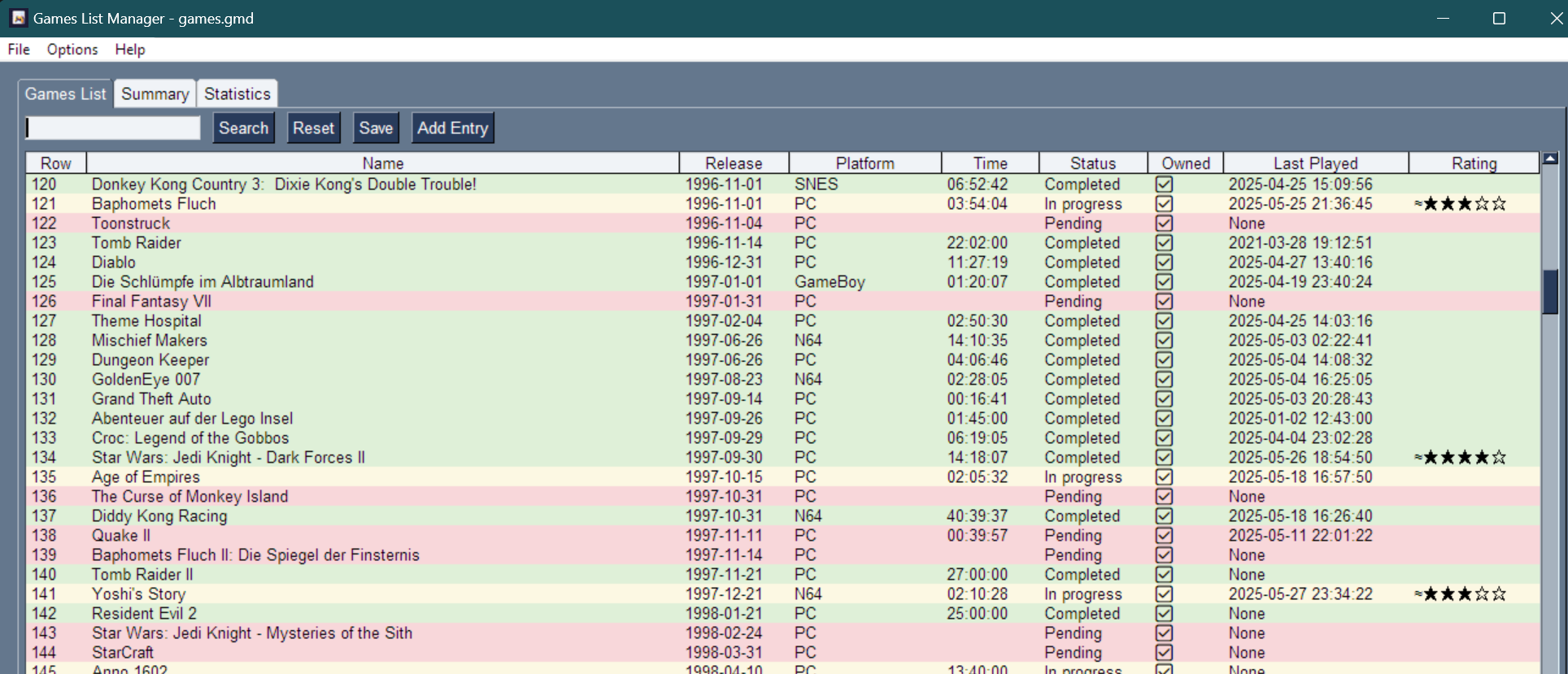
Games List View
Comprehensive game library with sortable columns, color-coded status, and search functionality
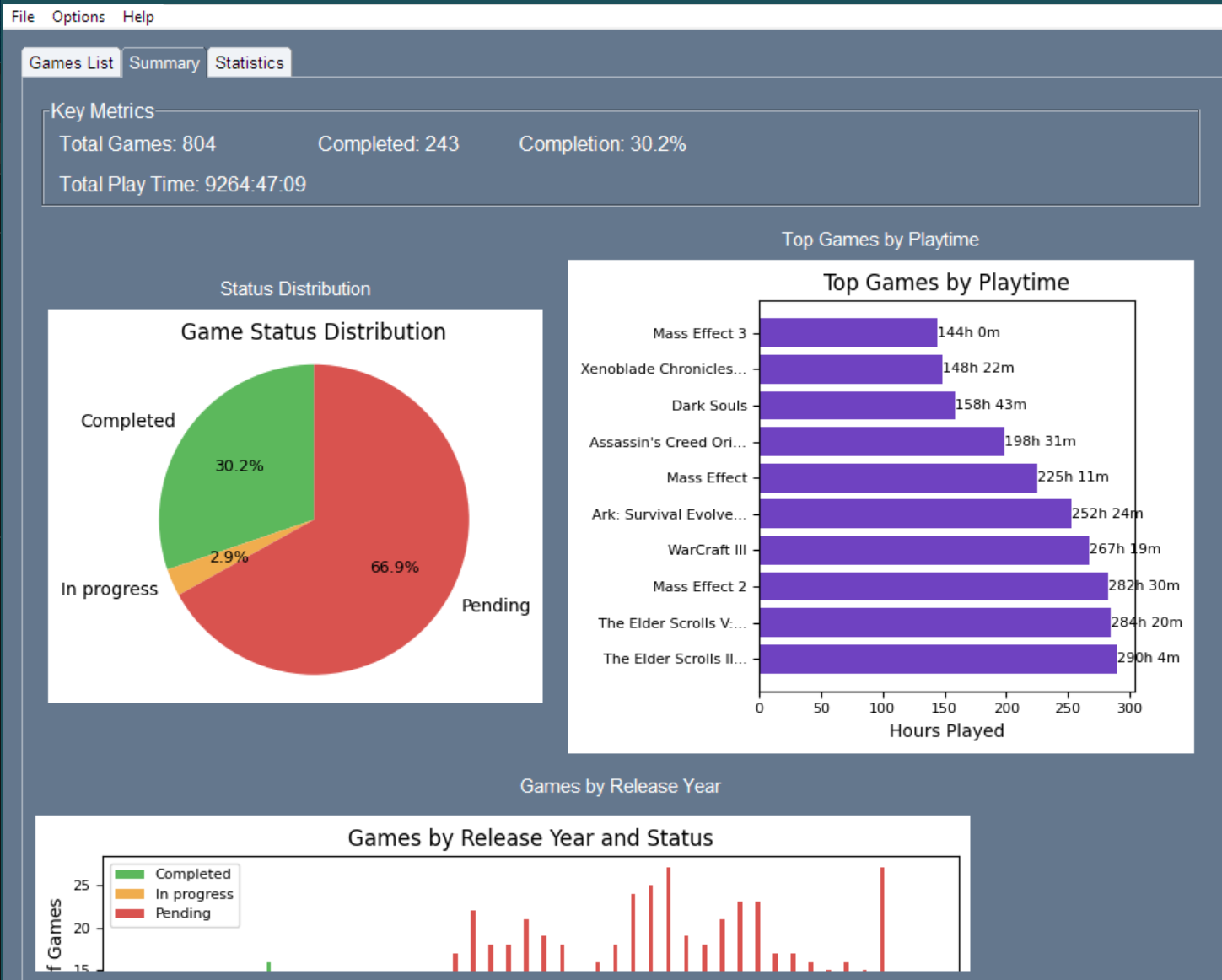
Summary Dashboard
Visual analytics including status distribution and top games by playtime
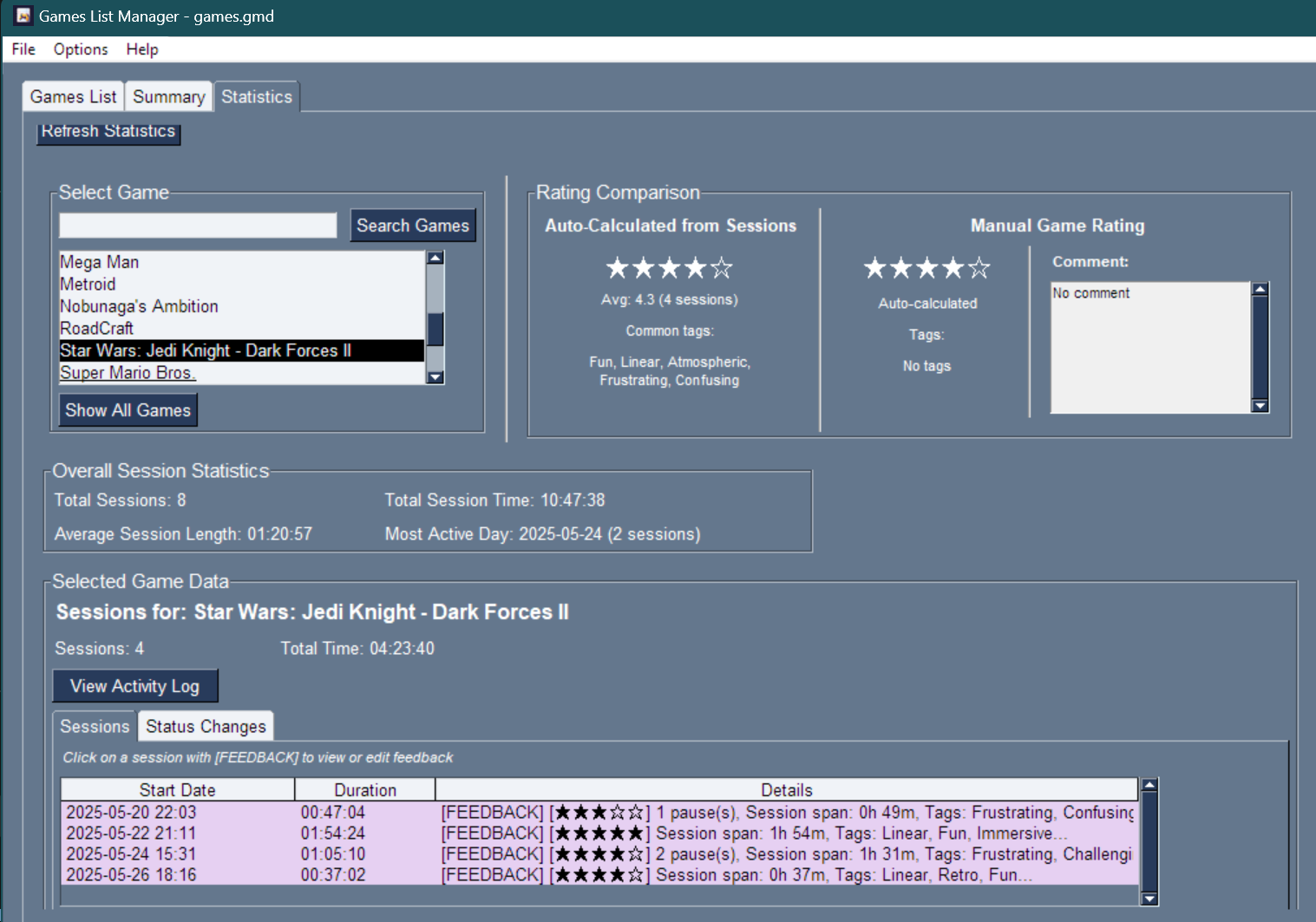
Statistics View
Detailed game analysis with rating comparisons and comprehensive statistics
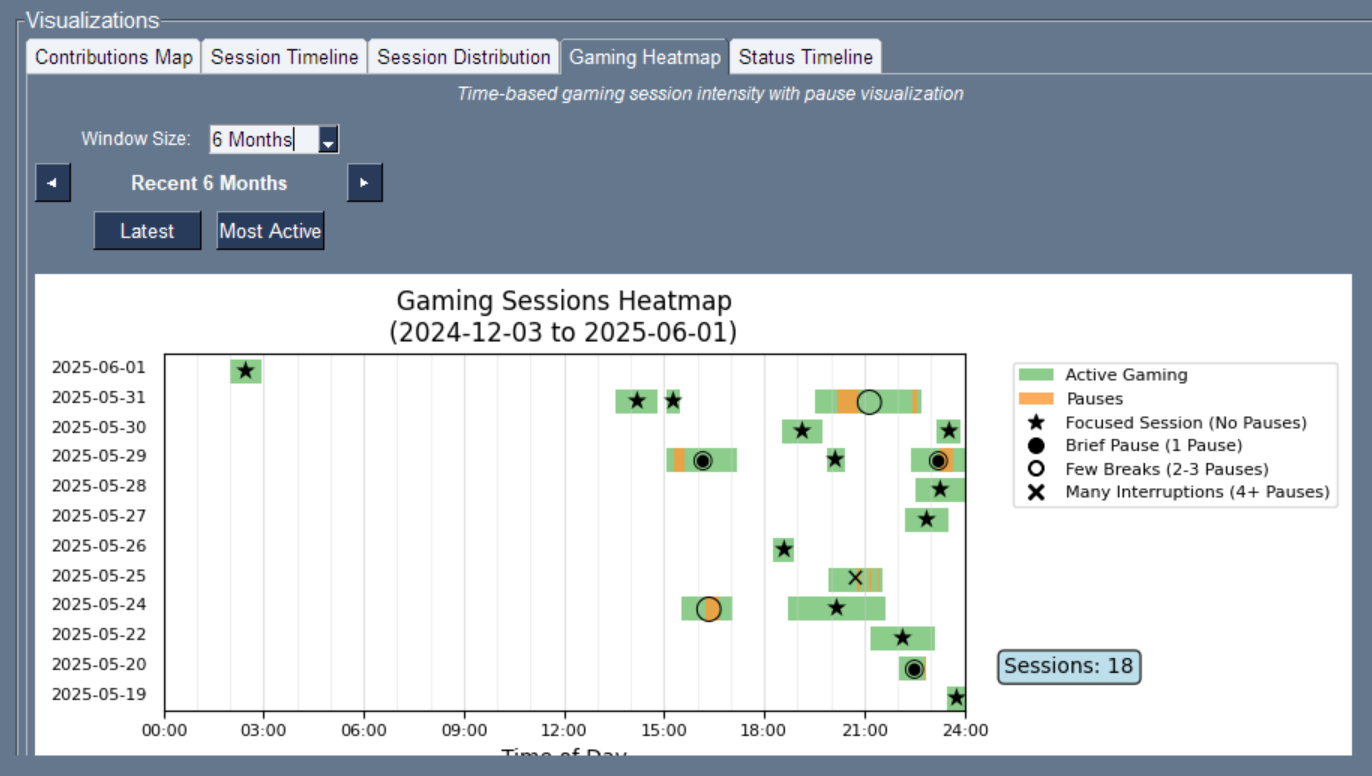
Gaming Heatmap
Time-based gaming sessions heatmap revealing optimal gaming hours and session patterns
๐Ÿ’ก Click on any screenshot to view full size
New in v1.11.0
โ–ผ

๐Ÿ›ฐ๏ธ Auto Session Tracking & IGDB

Play Without Pressing Start

On Windows, the process watcher records sessions when you launch a game. IGDB brings covers, metadata, and completion averages into your library.

๐Ÿ›ฐ๏ธ

Process Watcher

Detects game launches and tracks playtime automatically. Toggle via the Watcher menu.

๐ŸŽฏ

Smart Matching

Learned exe mappings, Steam/Epic/GOG manifests, and fuzzy matchโ€”with a toast when confirmation is needed.

๐Ÿ””

Toasts & Tray Controls

Session start/end notifications with cover art, system-tray pause/stop, and in-place wrong-game remap.

๐ŸŽจ

IGDB Integration

Fetch covers, genres, summaries, and critic scores. View Details per game or enrich the whole library in one pass.

New in v1.10.0
โ–ผ

๐Ÿ“… Daily Activity View

View Gaming Activity by Date

Explore your gaming history with detailed daily activity views. See exactly what you played, when, and for how long on any specific date.

๐ŸŽฏ

Date-Based Navigation

Browse through any date to see chronologically sorted gaming sessions with detailed timing information.

๐Ÿ“Š

Daily Summaries

Get instant insights with total time played, session count, and list of games for each day.

๐ŸŒ

Multiple Access Points

Quick access via View menu for Today/Yesterday, plus date picker for any specific date.

๐Ÿ’ฌ

Discord Integration

Discord Rich Presence shows which date you're currently reviewing to friends.

New in v1.9.0
โ–ผ

๐Ÿ”„ Auto-Updater System

Stay Always Up-to-Date

GamesList Manager now includes a comprehensive auto-updater system that keeps your application current with the latest features, improvements, and bug fixes.

๐ŸŽฏ

One-Click Updates

Download and install updates with a single click. The intelligent staging system handles everything safely in the background.

๐Ÿ“Š

Smart Progress Tracking

Real-time download progress with the ability to cancel at any time. No more waiting in the dark!

๐Ÿ”’

Safe Installation

Automatic backups are created before any update. If something goes wrong, rollback is automatic.

๐Ÿ“‹

Rich Release Notes

View detailed release information with images and formatted text right in the application.

โš™๏ธ

Flexible Settings

Configure startup checking, manage downloads, or disable entirely. You're in control.

๐ŸŒ

Cross-Platform

Works seamlessly on Windows, macOS, and Linux with platform-specific updater scripts.

๐ŸŽ›๏ธ Update Settings

Access via the Updates Menu:

  • Check for Updates: Manually check for and install updates
  • Update Settings: Configure startup checking, manage downloads, or disable auto-updates entirely

Auto-updates respect your preferences - they can be configured to check on startup or disabled completely based on your needs.

Installation

๐Ÿ“ฆ Quick Installation (Recommended)

For most users, the easiest way to get started:

Download: Go to the Releases section of the GitHub repository
Extract: Download the latest release zip file and extract it to your preferred folder
Run: Launch the application by running GameTracker.exe (Windows)

That's it! No additional setup, Python installation, or dependency management required.

โš ๏ธ Windows may block the first launch
GameTracker isn't signed with a paid Microsoft certificate, so Windows can flag it as coming from an "unknown publisher." It's a false positive โ€” the app is open source and the code is on GitHub.
  • SmartScreen ("Windows protected your PC"): click More info โ†’ Run anyway.
  • Smart App Control (Windows 11) is stricter and may block unsigned apps with no "Run anyway" option. Right-click GameTracker.exe โ†’ Properties โ†’ Unblock, or turn it off under Windows Security โ†’ App & browser control โ†’ Smart App Control.

๐Ÿ”ง Build from Source

Version 2.0 runs on Flet (Flutter) โ€” no more PySimpleGUI. A plain pip install is all that's needed.

Clone the Project:
git clone <repository-url>
cd GamesList
Set Up a Python Environment (3.10+):
python -m venv .venv
.venv\Scripts\activate # Windows
source .venv/bin/activate # macOS/Linux
Install Dependencies:
pip install -r requirements.txt
Run the Application:
python app_flet.py

To produce a native, self-contained executable, use flet build โ€” see docs/BUILD.md in the repository for the full guide.

System Requirements

Operating System

Windows, macOS, or Linux

Python

3.10+ to build from source โ€” the packaged release bundles its own runtime

Memory

512MB RAM minimum

Storage

50MB available space

Note: This application has been primarily developed and tested on Windows. macOS and Linux compatibility may require additional configuration.
๐ŸŽช Discord Rich Presence Integration

Show your gaming library management activity on Discord! Your status will dynamically update to show what you're doing:

โœ… Ready to Use - No Setup Required!
Using the pre-built release? Discord Rich Presence is already fully configured and working out of the box! The release binaries include a verified Discord application integration - just download, run, and enjoy automatic Discord status updates.

The setup instructions below are only needed if you're building from source or want to use your own Discord application.
๐ŸŽฎ
Playing Games
Shows current game with elapsed session time
โธ๏ธ
Paused Sessions
Displays when gaming session is paused
๐Ÿ“
Browsing Library
Shows when exploring your game collection
๐Ÿ“Š
Viewing Statistics
Indicates when analyzing gaming data
โž•
Adding Games
Shows when adding new titles to library
โœ๏ธ
Editing Information
Displays when managing game details

๐Ÿ› ๏ธ Developer Setup Instructions

Only follow these steps if you're building from source or want to use your own Discord application

Create Discord Application: Go to the Discord Developer Portal and create a new application
Get Application ID: Copy the Application ID from the General Information tab
Configure GamesList Manager: Edit constants.py and replace the DISCORD_CLIENT_ID placeholder with your Application ID
Install Dependencies: Run pip install pypresence
Test It Out: Launch GamesList Manager with Discord running to see your status update!

Privacy Note: Discord Rich Presence only shares your current activity and general stats. No personal game data, ratings, or notes are shared. You can toggle this feature on/off anytime from the Discord button in the toolbar.

Quick Start Guide

Add Your First Game: Click "Add game" and fill in the details (use the calendar button to pick a release date)
Track Gaming Time: Open a game and use the built-in Play/Pause/Stop timer โ€” or let the Process Watcher track it automatically when you launch the game
Rate Your Experience: Add session feedback with ratings, tags, and notes
Explore Analytics: Check the Summary and Statistics tabs for insights
Organize Your Collection: Use search, filters, and sorting to manage your library
Configure Updates: Visit the Updates menu โ†’ Update Settings to manage auto-updates (can be disabled if preferred)